

After signing an IT Annual Maintenance Contract (AMC), many business owners assume technical support starts right away. But have you ever stopped to think about what actually happens between signing the agreement and receiving day-to-day IT help?
The truth is, support does not begin instantly. There is a planned transition phase known as the IT AMC onboarding process. During this phase, your IT service provider prepares your systems, confirms responsibilities, and aligns support methods with your business needs – just as detailed in our IT AMC services overview. This preparation phase reduces confusion, prevents service delays, and lowers the chances of downtime or security problems later.
This guide explains each stage of the process from reviewing the contract to activating support — in a clear and simple way for small and mid-sized businesses.
What Is the IT AMC Onboarding Process?
The IT AMC onboarding process refers to the structured activities carried out after an AMC is signed but before full support begins. It connects the agreement stage with real, ongoing IT support.
Unlike daily IT support, which focuses on resolving tickets and user issues, onboarding is about preparation. It focuses on:
- Reviewing and understanding your existing IT setup
- Providing the support team with required access and tools
- Defining what systems and services fall under support
- Avoiding unexpected issues once support goes live
When onboarding is done properly, IT problems are identified early and addressed before they disrupt business operations.
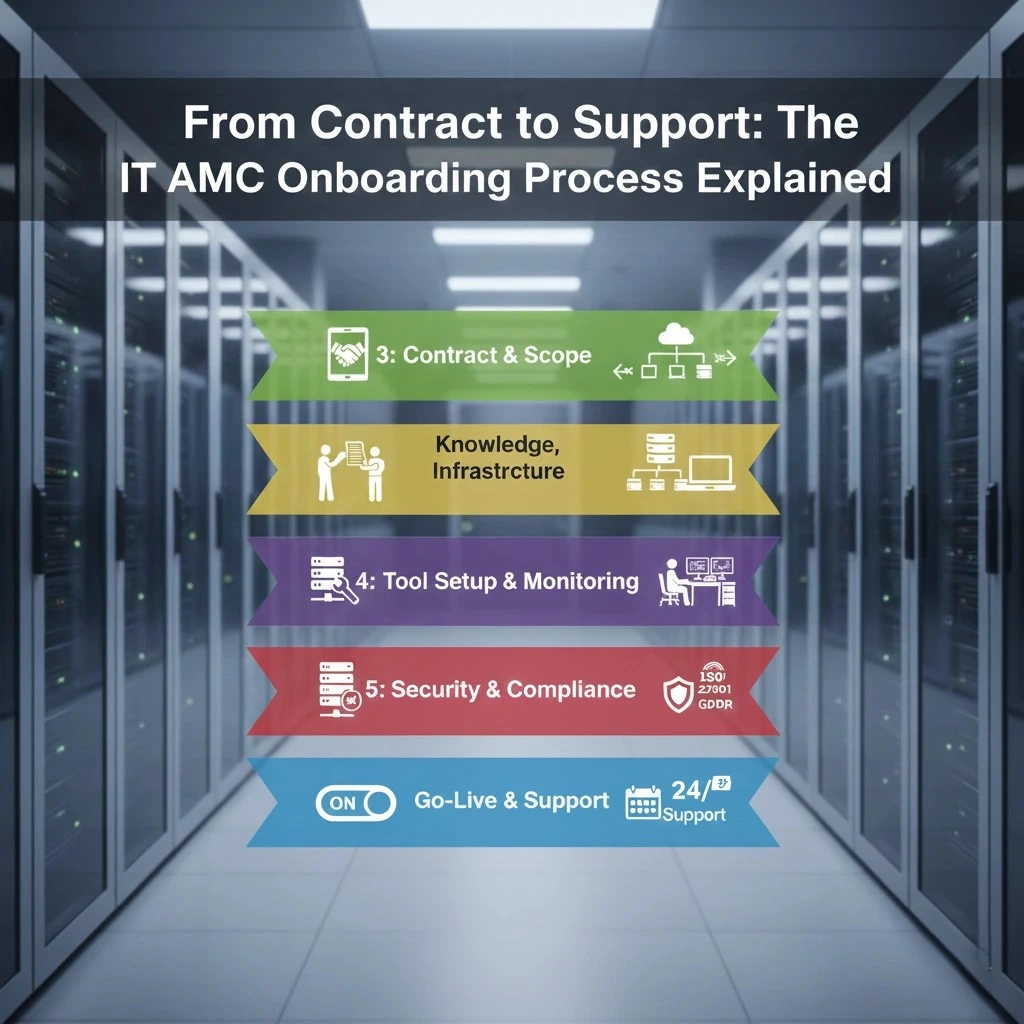
Step-by-Step IT AMC Onboarding Process
A clear sequence helps avoid gaps and confusion. Below is a practical breakdown of how IT AMC onboarding usually works.
Step 1 – Contract Review, SLA Check, and Scope Confirmation
Before technical work starts, the IT provider carefully reviews the agreement. This includes:
- Going through contract terms and the Service Level Agreement (SLA)
- Confirming response times and issue resolution timelines
- Identifying which systems, devices, and services are covered
- Finalising support hours and escalation procedures
This step makes sure both sides have the same understanding of service expectations and responsibilities.
Helpful tip: Ask your provider for a simple chart showing support availability during working hours and after hours.
Step 2 – IT Infrastructure, Asset, and Risk Review
Once the scope is confirmed, the provider examines your IT environment in detail. This review usually covers:
- Physical equipment such as servers, desktops, laptops, and network switches
- Software tools and licence validity
- Network design and configurations
- Cloud platforms currently in use
- Older systems that may no longer be supported
This assessment helps identify weak points and areas that may need attention early.
Step 3 – Knowledge Transfer, Vendor Transition, and Documentation
Clear records are essential for effective support. During this stage:
- Existing IT teams or previous vendors share system access details and licences
- Network layouts, backup methods, and configurations are documented
- All information is organised into a single reference source
Well-maintained documentation allows support engineers to respond faster and with fewer errors.
Step 4 – Tool Setup, Access Management, and Monitoring
To support systems efficiently, the right tools must be in place. This step involves:
- Installing remote monitoring and management (RMM) software
- Setting up a helpdesk or ticketing platform
- Configuring device and endpoint management
- Assigning access based on user roles and responsibilities
These tools help the support team track system health and respond to issues quickly.
Step 5 – Security Setup, Compliance Alignment, and Policy Review
Security checks are a key part of onboarding. Typical activities include:
- Deploying or updating antivirus and malware protection
- Checking patch update processes across all devices
- Reviewing firewall rules, backup routines, and password policies
- Aligning systems with applicable compliance standards such as ISO 27001 or data protection requirements
This step ensures your IT environment meets basic security expectations before full support begins.
Step 6 – Change Approval, Go-Live, and Support Start
In the final phase:
- All onboarding tasks are reviewed and approved
- A formal support start date is confirmed
- Incident, change, and issue handling procedures are activated
- The helpdesk becomes the main contact point for IT support
At this stage, your AMC officially moves into active support.
How Long Does the IT AMC Onboarding Process Take?
There’s no single answer, but typical timelines look like this:
- Small business (single site): 1-2 weeks
- Mid-size business (few locations): 2-4 weeks
- Enterprise or distributed offices: 4-8 weeks
Factors that affect timing include:
- Size and complexity of your IT estate
- Quality and readiness of documentation
- Number of third-party vendors involved
- Cloud systems and remote users
Clear communication during onboarding keeps the process predictable.
What Businesses Should Expect During IT AMC Onboarding
Once onboarding begins, you should see:
Regular status updates
Dedicated account ownership
Clear reporting on progress
A defined escalation contact list
Even if some tasks require downtime (like tool installation), these should be planned and communicated in advance to minimize impact on users.
Common Challenges During IT AMC Onboarding (And How Providers Handle Them)
No process is without hurdles, but experienced providers manage them well.
Poor Documentation
If your current documentation is missing or outdated, the support team will build it by doing discovery work and interviewing your IT staff.
Shadow IT
Untracked devices or software often appear during assessments. The provider should help identify and bring these under management.
Security Gaps
Older systems or missing security tools might be flagged. A priority plan for patching and protection is created to bring risk down fast.
These challenges are common, and good communication makes them easier to resolve.
How to Choose the Right IT AMC Provider for Smooth Onboarding
A smooth onboarding experience starts with the provider. Look for:
- A well-defined onboarding workflow
- Use of proven tools and monitoring systems
- Strong documentation standards
- Security and compliance knowledge
- Experience supporting businesses of your size
- Clear communication style
Ask potential providers about previous onboarding cases similar to your business so you know what to expect.
Why a Structured IT AMC Onboarding Process Matters for Long-Term IT Success
A structured approach delivers measurable benefits:
Faster incident resolution – Technicians know your systems well before problems occur.
Reduced downtime – Monitoring and tools catch issues early.
Predictable outcomes – You have clear metrics and reports.
Better user satisfaction – Fewer surprises and smoother support.
These outcomes support your business continuity and help IT contribute to growth rather than slow it down.
Final Thoughts – From IT Contract to Strategic Technology Partnership
The IT AMC onboarding process is often overlooked, but it’s the foundation for successful IT support. When done right, it sets the stage for a reliable daily support experience, clearer communication, and a stronger working relationship between your business and your IT service provider.
If you’re ready to make your IT support transition smooth and efficient, contact us at Jachoos Systems. We help organisations like yours move from contract signing to proactive support with confidence.
Learn more about our IT AMC services or request a personalized onboarding plan today.
Is IT AMC onboarding mandatory?
Yes. It prepares your systems so support teams can work effectively with minimal disruption.
Can businesses customize the IT AMC onboarding process?
Yes. Most providers adjust steps based on your business size, tools, and priorities.
What documents are required for IT AMC onboarding?
Common requirements include network diagrams, asset inventories, licences, and configuration records.
Does IT AMC onboarding include compliance and security audits?
Yes. Basic security checks and policy alignment are standard parts of onboarding.
How soon after onboarding does support begin?
Official support usually starts on a defined go-live date once all setup steps are approved.